
ChainRecon
ChainRecon is a framework for analyzing what an IoT device is actually doing on the network.
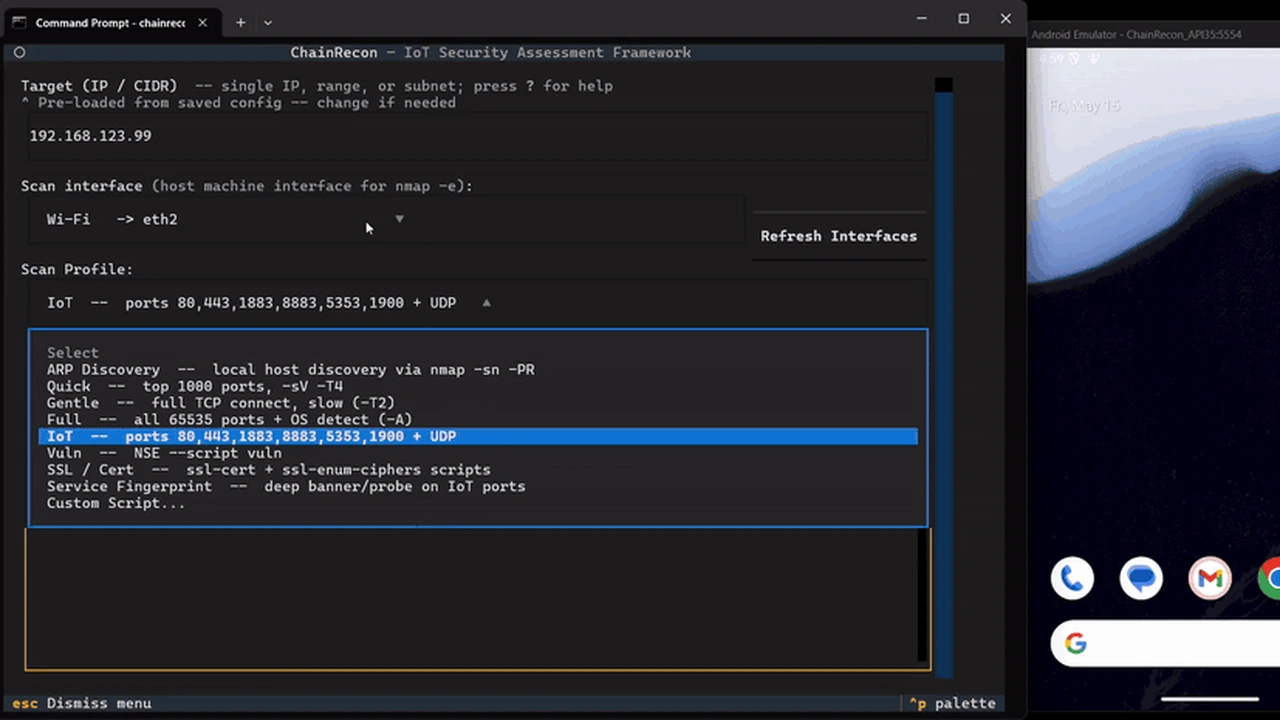
ChainRecon is a local IoT security analysis toolkit. It helps you inspect what a device is doing across network traffic, Android APKs, Frida runtime behavior, firmware files, workflow runs, and generated reports.
It is built for lab work where you control the network, emulator, APKs, packet captures, and test devices. It does not magically break into devices or replace the external tools it wraps. It gives you a repeatable place to run those tools, collect artifacts, and keep the evidence together.
What You Can Do With It
- Put your computer between an IoT device and the internet, then capture and analyze traffic.
- Run nmap profiles and turn raw scan output into structured findings.
- Analyze saved pcaps for DNS, TLS SNI, HTTP, MQTT, RTP/SRTP, WebRTC/STUN, certificates, entropy, and cleartext secrets.
- Decompile Android APKs with jadx and inspect permissions, exported components, network security config, SDKs, hardcoded credentials, and pinning indicators.
- Run managed Frida scripts against Android apps and emulators, including loaded-class discovery, live class monitoring, HTTP/socket tracing, crypto tracing, SharedPreferences tracing, and Nooie MQTT/token tracing.
- Run YAML workflows that combine scan, capture, Frida, firmware, APK, report, and community-plugin steps.
- Generate reports in XLSX, JSON, HTML, and CSV. XLSX is the default format shown in the UI.
- Run early firmware triage with binwalk extraction when available, strings/config/certificate/key checks, and direct fallback scanning when extraction is not available.
The firmware module is still in its beginnings and will be expanded later. Right now it is useful for first-pass triage, not full firmware reverse engineering.
Reports are also still expected to improve. The current reports are useful for review and evidence capture, but the log files are often just as important because they preserve the raw tool output, Frida stream, workflow errors, and exact paths that explain what happened.
Install From Source
Use Python 3.10 or newer.
git clone https://github.com/Immortal-ibr/ChainRecon.git
cd ChainRecon
python -m pip install -r requirements.txt
python -m pip install -e .
On Windows, use PowerShell or Windows Terminal. Some network setup operations need Administrator privileges.
On Linux, install the system tools you plan to use. At minimum, traffic and scan workflows usually need:
sudo apt install nmap tshark tcpdump android-tools-adbPackage names vary by distribution.
Optional Python Extras
The project can be installed with focused extras:
python -m pip install -e ".[tui]"
python -m pip install -e ".[frida]"
python -m pip install -e ".[full]"
python -m pip install -e ".[dev]"
For day-to-day development, use:
python -m pip install -e ".[full,dev]"Arch Linux Package
PKGBUILD for Arch-style packaging.
makepkg -siThe package build depends on Arch package names being available on the host. If makepkg fails because a dependency name differs on your system, install the missing package manually or adjust the package name before rebuilding.
Updating an Existing Install
If you installed from a source checkout, update the checkout and reinstall the editable package:
git pull
python -m pip install -e ".[full,dev]"
If you installed directly from GitHub with pip:
python -m pip install --upgrade git+https://github.com/Immortal-ibr/ChainRecon.gitIf you installed from a wheel, download or build the newer wheel and upgrade with:
python -m pip install --upgrade path/to/chainrecon-1.0.0-py3-none-any.whlIf you installed through the Arch package, pull the latest source and rebuild:
git pull
makepkg -si
After updating, run chainrecon --help to make sure the command resolves to the environment you expect.
Run It
Launch the TUI:
chainreconThe source-checkout compatibility command is still supported:
python chainrecon.pyRun common CLI workflows:
chainrecon analyze-traffic captures/device.pcap --format xlsx --output output/traffic.xlsx
chainrecon scan 192.168.1.50 --profile ssl --format xlsx --output output/scan.xlsx
chainrecon report output --format xlsx --output output/report.xlsx
chainrecon firmware firmware.bin --format xlsx --output output/firmware.xlsx
chainrecon workflow run workflows/nooie_mqtt_tls.yaml --target 192.168.123.99 --device-profile nooie --dry-run
The same commands work through python chainrecon.py ... from a source checkout.
Network Setup
The normal lab position is:
IoT device -> dedicated router -> your computer -> internetYour computer becomes the gateway/NAT point. ChainRecon can then capture traffic without rooting the device or installing anything on it.
The Network Setup screen uses active scripts for both desktop paths:
- Windows:
scripts/network_setup.ps1, run through PowerShell with Administrator privileges. - Linux:
scripts/network_setup.sh, run throughsudowithip,iptables, andsysctl.
External Tools
ChainRecon detects optional tools at startup and shows what is missing. Missing tools only disable their matching workflows.
| Tool | Used for |
|---|---|
nmap |
scan profiles and service discovery |
tshark / tcpdump |
live packet capture |
jadx |
APK decompilation |
apktool |
APK resource decoding |
adb |
Android emulator/device control |
frida, frida-ps |
Android runtime instrumentation |
binwalk |
firmware extraction |
For Windows paths that are not on PATH, use config/local.yaml:
tools:
  jadx: 'C:\tools\jadx\bin\jadx.bat'
  apktool: 'C:\tools\apktool\apktool.jar'
Use single quotes in YAML for Windows paths so backslashes are not treated as escapes.
Frida Workflow
Install Frida tools:
python -m pip install frida-toolsStart an emulator or connect a device, then verify:
adb devices
frida-ps -U
In the TUI, open Frida, choose the device, enter a package name such as com.nooie.home, choose a built-in script, and run it. The page defaults to List App Loaded Classes. Long-running hooks stay managed by ChainRecon so Stop Hook records a user stop instead of an unexpected exit.
Useful Frida scripts include:
List App Loaded ClassesDevice-Wide Class CensusLive Loaded Class MonitorHTTP TraceSocket and URL MonitorCrypto MonitorShared Preferences WatchNooie MQTT and Token Trace
The HTTP, socket/URL, crypto, shared preferences, and Nooie tracing scripts keep their default hooks and let you add extra classes from the UI.
APK Analysis
Run:
chainrecon apk path/to/app.apk --format xlsx --output output/apk.xlsxAPK analysis uses jadx when available. It reads AndroidManifest.xml, checks exported components and dangerous permissions, scans network_security_config.xml, looks for known SDKs, and searches decompiled code for credentials and pinning indicators.
Firmware Analysis
Run:
chainrecon firmware path/to/firmware.bin --format xlsx --output output/firmware.xlsxIf binwalk is present, ChainRecon attempts extraction first. If extraction is not available or fails, the module still performs direct file triage and records the warning. This module is intentionally early-stage and will be expanded later with better filesystem unpacking, architecture detection, vendor config parsing, and binary triage.
Workflow Engine
Run a dry run first:
chainrecon workflow run workflows/nooie_mqtt_tls.yaml --target 192.168.123.99 --device-profile nooie --dry-runWorkflows can chain scan, TLS, pcap, Frida, firmware, report, and community-plugin steps. Device profiles live in profiles/devices/*.yaml; profiles/devices/nooie.yaml is the authoritative Nooie profile. Config values are runtime defaults and should not override the profile fields.
Reports And Logs
Reports can be generated as:
- XLSX
- JSON
- HTML
- CSV
XLSX is the default user-facing report format. HTML and CSV are useful for browsing and filtering, while JSON is best for automation.
Do not ignore logs. Logs are important for debugging and evidence review because they keep details that reports intentionally summarize: raw tool output, Frida events, workflow step failures, output file paths, command lines, and stop/exit status.
Configuration
Built-in defaults live in config/default.yaml. Local overrides go in config/local.yaml:
network:
  eth_interface: Ethernet
  internet_interface: Wi-Fi
  router_ip: 192.168.123.1
  target_ip: 192.168.123.50

output:
  directory: ./nooie_analysis

tools:
  jadx: 'D:\tools\jadx\bin\jadx.bat'
Environment variables also work for tool paths and API keys.
Project Layout
chainrecon/          Installable Python package
chainrecon.py        Compatibility CLI wrapper for source checkouts
scripts/             Windows and Linux helper scripts
config/              Default and local configuration
profiles/            Shared device profiles
workflows/           YAML workflow definitions
community_plugins/   Optional community analyzers
documentation/       Project notes and testing docs
tests/               Unit, integration, e2e, and requirement tests
Temporary compatibility packages still exist for old imports like analysis, runners, tui, utils, plugins, and models. New code should import from chainrecon.*.
Test And Verify
Run the full suite:
python -m pytest --tb=short -qSmoke-test the CLI entrypoints:
python chainrecon.py --help
python -m chainrecon --help
chainrecon --help
Build and test the wheel:
python -m build --wheel
python -m pip install dist/chainrecon-*.whl
chainrecon --help
TUI Reliability Notes
Admin PowerShell can use the older conhost terminal host. ChainRecon switches to ASCII borders when Windows Terminal is not detected and strips leaked terminal control sequences from logs.
Single-line fields normalize pasted Windows paths, multiline clipboard text, and file:// URLs. Output panes keep the last visible lines bounded, but saved log files preserve the important details for later review.
Troubleshooting
The TUI shows question marks or broken borders. Use Windows Terminal when possible. ChainRecon falls back to ASCII borders in older console hosts.
Escape text like ^[[<35;28;21M appears. That is leaked mouse reporting from the terminal. ChainRecon disables those modes on startup and sanitizes rendered logs.
No traffic is captured. Check the interface name and verify the IoT device is actually routing through your computer.
jadx is not found. Put its path in config/local.yaml or add it to PATH.
Frida cannot attach. Confirm adb devices, frida-ps -U, matching frida-server architecture, and that the target package is running or launchable.
Which Nooie profile is used? The shared profile is profiles/devices/nooie.yaml. Config files provide runtime defaults; they are not the source of truth for the Nooie profile.